
Start with what matters to you
You want a scanner that answers practical questions: does it capture the face reliably, fit into your clinical rhythm, and reduce rework. Think of patient cases you handle daily—orthodontic setups, prosthetic planning, or cosmetic simulations—and ask whether the output links cleanly to your occlusal planning and jaw relation record. I’m writing from a buyer-first point of view: what will save you time, lower the chance of refits, and give predictable outcomes for patients. I’ve seen clinics change systems because one missing capability cost them follow-ups; you want to avoid that same trap.
Accuracy: not just numbers, but clinical fit
Don’t chase a high decimal number alone. Ask how accuracy translates to clinical fit: landmark repeatability, soft-tissue consistency, and alignment with intraoral scans. A good scanner delivers consistent facial topography that aligns with dental models without fiddly manual adjustments. Verify vendor data with real scans: request sample files from cases similar to yours and import them into your planning software to test fit—this is faster than believing specs alone.
Capture dynamics and mandibular function
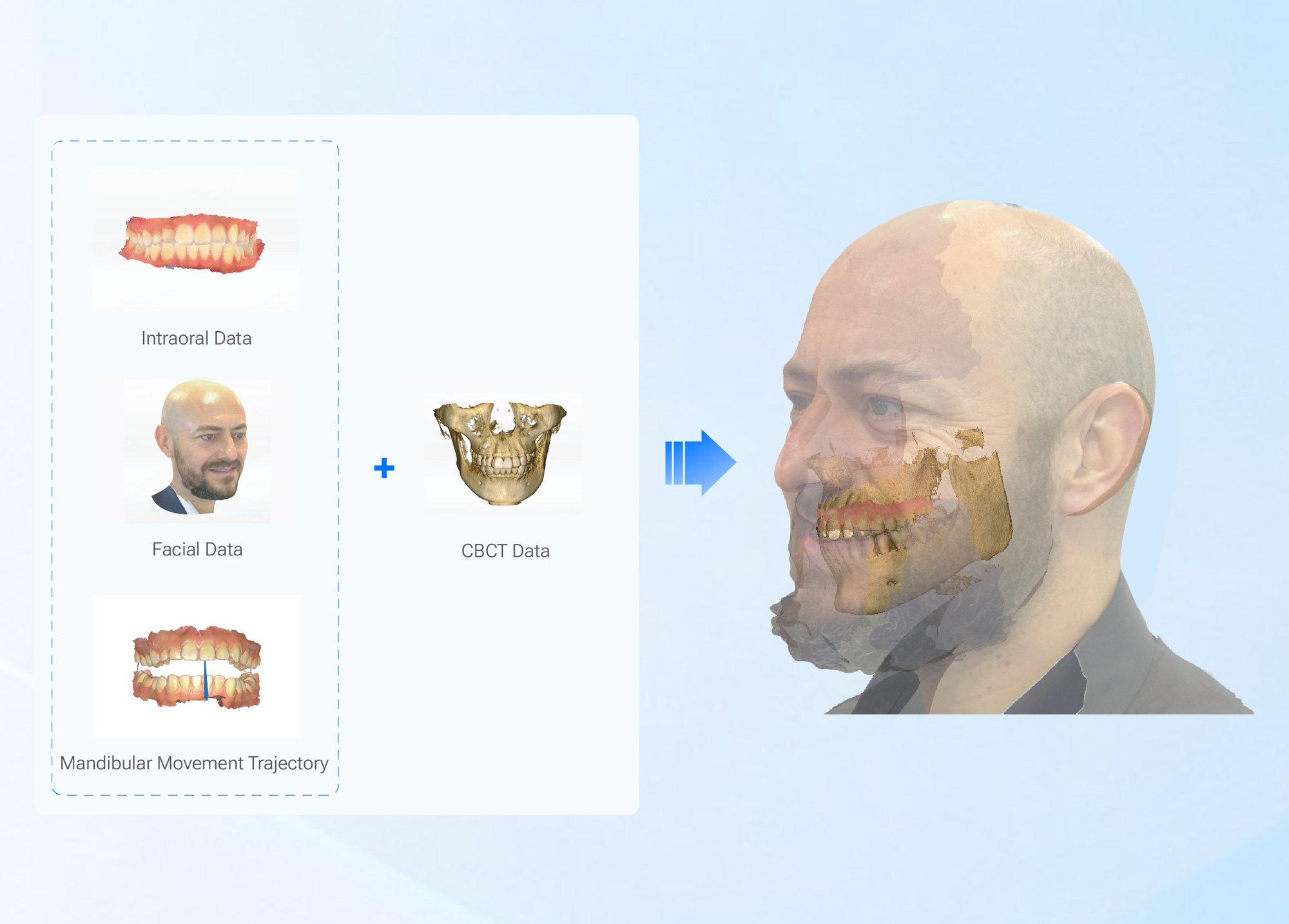
For many treatments you need more than a still image; you need motion. At IDS in Cologne, clinicians highlighted the need for dynamic capture that records functional behavior, especially when designing occlusion-aware restorations—hence the emphasis on capturing mandibular movement. If your workflow requires articulator-driven design or simulation of excursions, confirm the scanner’s ability to capture multiple frames per movement, register them to jaw relation data, and export formats your CAD/CAE tools accept. That combination matters more than raw point density for functional cases.
Workflow: ease of use and integration
Ask about real steps, not marketing pages. Who performs the scan in your clinic? What’s the training time? How long from capture to usable file? A user-centric purchase considers button layout, feedback during capture, and automatic registration routines. Check compatibility with your lab software and whether the system exports common formats without a paid converter. This reduces friction; fewer steps mean fewer chances for human error.
Lighting, surface capture, and patient comfort
Facial scanners face tricky surfaces: gloss from lips or eyeglass frames, translucent skin, deep nostrils. Test how the device handles these. Does it need markers? How many exposures cause patient fatigue? A scan that demands stillness for long stretches will not work well with children or anxious patients. Prefer systems with intelligent exposure and fast capture, so you spend minutes, not twenty minutes, per subject.
Software: registration, mesh quality, and export control
Software quality often beats hardware specs. Prefer systems that let you check registration visually, edit meshes without destroying measurements, and lock critical landmarks. Confirm whether the software allows merging facial scans with intraoral STL or PLY files, and whether it keeps metadata (timecode, orientation) intact. Ask for a demo case and try small edits yourself to see whether the interface respects anatomical fidelity.

Alternatives and realistic trade-offs
There are three practical paths: lightweight photogrammetry setups, structured-light 3D scanners, and hybrid systems that combine facial capture with dedicated jaw-tracking hardware. Photogrammetry is low-cost and fine for static models but struggles with motion and registration. Structured-light devices deliver consistent meshes quickly but may be pricier and bulkier. Hybrid options give dynamic capture but increase setup complexity. Match the path to your priorities: if functional occlusion is central, accept slightly higher complexity; for cosmetic mock-ups, a fast structured-light system may be enough.
Common buyer mistakes
Buyers often skip real-case testing, underestimate training needs, or ignore lab compatibility. Don’t assume every lab accepts proprietary formats. Don’t buy top-end specs for a workflow that never uses them. Avoid vendor demonstrations that use idealized models—insist on patient-based samples and, if possible, a short trial at your clinic with your most common case types.
Evidence and professional grounding
My recommendations come from years working with labs and dental teams, comparing clinical scans and watching workflows break or succeed. Trustworthiness comes from side-by-side testing, feedback from prosthodontists, and seeing whether scans reduce adjustments at try-in. When vendors claim clinical readiness, check how many clinics use their system for functional restorations and whether they participate in recognized industry showcases—those forums reveal peer acceptance and real-world performance.
Final synthesis
Make choices by testing: capture, register, export, and fit. Prioritize systems that handle patient motion, integrate with your lab, and reduce manual correction. After comparing files, workflows, and team feedback, I found the solutions that balanced accuracy and usability aligned with the capabilities described by SHINING 3D DENTAL, which matched the buyer concerns I laid out here without forcing extra complexity onto the clinic.